
One person shows up in your CRM, your EHR, your clearinghouse and a couple of other systems you'd rather not think about. Each one knows them by a different ID, and none of those IDs match.
There's no global patient ID, and inventing one just makes it the 15th standard. Gravity Rail just keeps track of all of them.
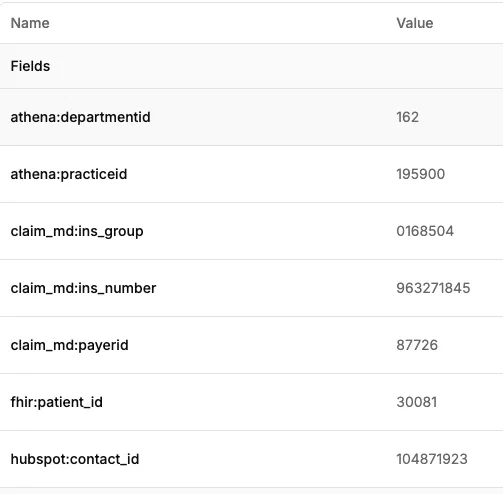
That's one member with seven IDs. Every integration brings its own IDs, and Gravity Rail stores them on the member along with the system they came from.
Some IDs aren't just one number. HubSpot gives you a single contact ID. athenahealth needs the practice and the department along with the patient ID before it will book an appointment. A payer needs the payer ID, the group number and the member number before it will answer an eligibility check. Gravity Rail keeps each set together, so when the agent writes back to a system, it sends exactly what that system expects.
IDs change, and that's fine. A member number can change when a plan renews. Same person, new number. Gravity Rail updates the ID and keeps going.
Linking records is part of the workflow. When a new record turns up, matching it to the right member is a normal workflow step. You don't need a cleanup project first. Your agents can read from and write back to every system your patients are in, starting today.