
0.70-second time to first audio in our testing. 26 voices. 25 languages. Frontier intelligence — available across phone, SMS, web, email, Slack and, because this is healthcare, even fax and pager workflows.
At Gravity Rail, we provide two things:
- Conversations with AI and human agents — all connected to your system of record.
- A coding agent, which we call the Workspace Manager.
We've now brought Grok by SpaceXAI to both sides of Gravity Rail: Grok 4.5 helps teams build and manage their workflows, while Grok Voice carries those workflows into live conversations.
But this is not really a story about adding two model names to a menu. It is about what becomes possible when a voice agent is fast, accurate and capable enough for real healthcare conversations.
We have learned that people are totally fine talking to an AI on the phone — but that does not mean all AI models are created equal, and seemingly small differences make a huge difference in the real world.
So fetch yourself a cup of tea. Let's nerd out together on why improvements to conversational AI turn directly into healthcare outcomes.
My mum is a power user
My mum is 89. A smartphone is largely inaccessible to her. A telephone call routed straight to her Bluetooth hearing aids is not.
My mother has spoken with Gravity Rail nearly every day for more than a year — specifically with her AI assistant, Seamus, whom she has decided is very handsome.
Seamus knows her address book. He can forward calls. He remembers her preferences. He can read and update her email and calendar. My sister and I can adjust his tools, permissions and preferences through Gravity Rail.
What Seamus tells me is one powerful thing: when an AI assistant is actually helpful in your life, it creates a real sense of possibility and a real sense of connection.
But there's a catch.
Slow responses cost connection
We've all had a laggy phone call. You know what it's like. A laggy AI conversation is even worse. With every delayed utterance, it reminds the user that they're talking to a machine.
People repeat themselves. They talk over the agent right as it's beginning to speak. The new interruption sends everything back to the AI and it has to start over. Oh, and by the way: this burns tokens too — in our production traces, interruptions increase token usage by roughly 5% on average — and it burns trust.
Healthcare does not need AI that pretends to be human. It needs AI that doesn't distract you by being a firehose of awkwardness. Grok Voice — from SpaceXAI — hits closer to that mark than any other model we've tried, and we've tried almost all of them.
A fast response is useless if it's wrong
A highly responsive voice agent that sends a patient to the wrong clinic is worse than an agent that takes another second to answer. In healthcare, conversational quality and operational accuracy cannot be separated.
This is primarily why, until now, 100% of our public deployments have used a traditional pipeline stack:
speech-to-text → language model → text-to-speech
This allows us to make trade-offs for the customer based on their latency, tool calling, cost, prosody and voice requirements. It works, and we have engineered it hard. But it is complex, expensive to operate, and every boundary between systems creates another opportunity to add latency or lose information.
Grok Voice Think Fast 2, built by SpaceXAI, is the first native speech-to-speech model we have tested that we are prepared to deploy in production healthcare workflows.
For us, that's a big bet. Let's talk about why.
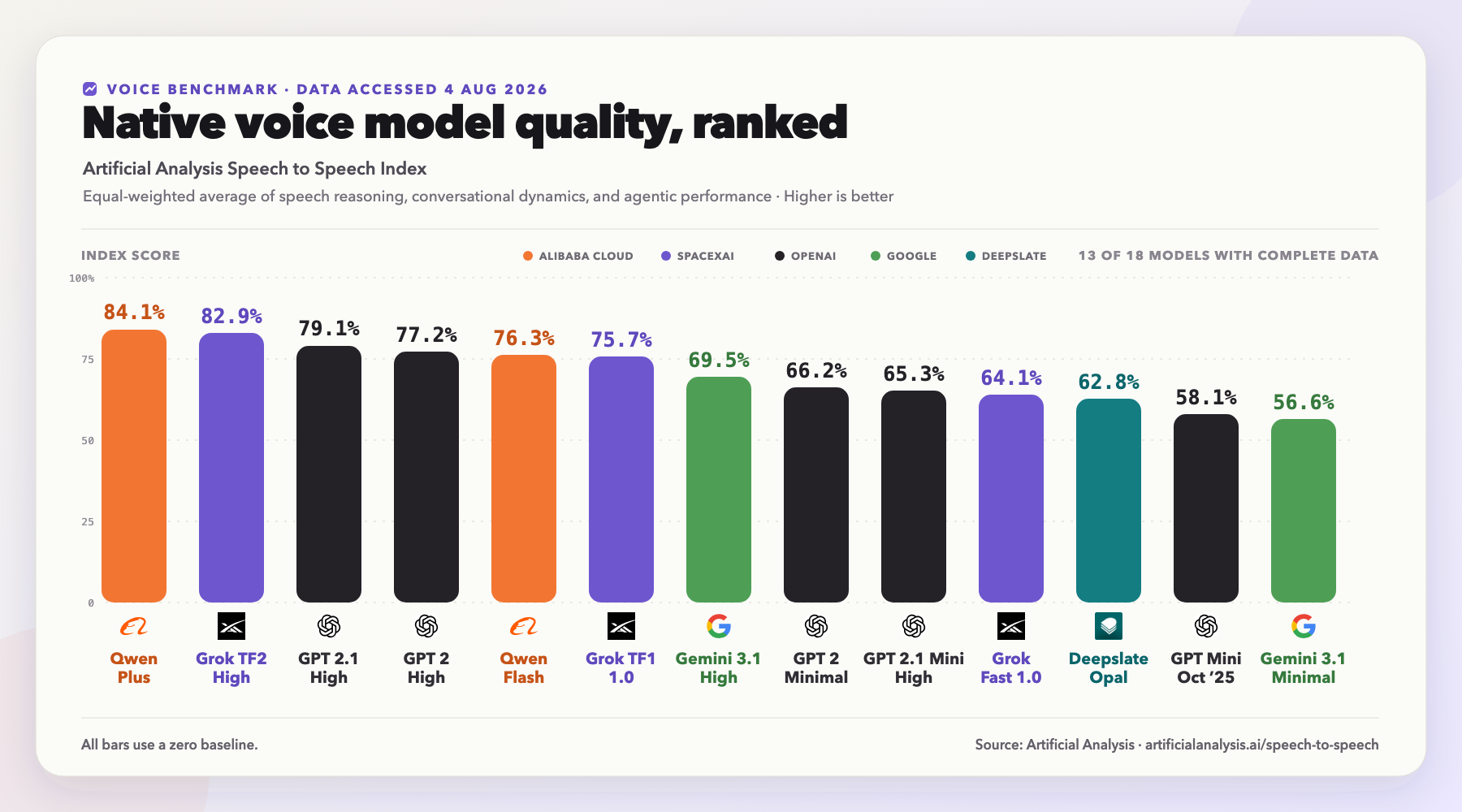
Credit: Artificial Analysis
How the leading voice stacks compare
We support multiple voice architectures because new models come along all the time, and our goal is to always offer our customers the best models in the world. This means we have a strong empirical as well as statistical understanding of where the models work well.
Gemini Live is great on cost and languages and strong on tool use, but you cannot change the tools or prompt during a session.
GPT Realtime is the closest in features and performance to Grok — but in our workload simulations, GPT-Realtime-2.1 costs approximately twice as much per conversation minute as Grok Voice.
Nova 2 Sonic is attractive if you're on AWS, but we haven't gotten the tool calling performance we wanted (nor looked at it for a long time, if I'm being honest).
That leaves traditional pipeline stacks as the only working option. However, at >1.5 seconds median latency, even with all the smart engineering tricks in the world (and more coming), it's clearly the past. The problem was, until now, we didn't really have a future.
Grok Voice's advantage is the combination: low latency (about 3x better than our pipeline stack), excellent understanding of telephone audio, reliable tool use, natural voices, and the ability to change the agent's instructions and available tools while a conversation is already underway.
| Capability | Grok Voice Think Fast 2 | Gemini 3.1 Flash Live | GPT-Realtime-2.1 | Nova 2 Sonic | Traditional pipeline |
|---|---|---|---|---|---|
| Response latency | Leading | Strong | Strong | Strong | Mixed |
| Transcription in noisy phone calls | Leading | Strong | Strong | Strong | Mixed |
| Change prompts and tools mid-call | Yes | No | Yes | No | Yes |
| Agentic tool reliability | Leading | Mixed | Strong | Strong | Strong — but with a latency cost |
| Voice quality | Excellent | Excellent | Excellent | Good | Excellent |
| Language support | 25 | 70 | Broad multilingual support; no single official count published | 7 languages across 10 locales | Provider-dependent |
| Built-in voice selection | 26 | 30 HD voices | 10 voices | 16 currently listed voice IDs | Provider-dependent |
Sources: vendor documentation for supported languages, voices and codecs; Artificial Analysis for published latency and agentic benchmark results; Gravity Rail testing for runtime behavior and production suitability. Table excludes some models from the chart that we have not evaluated. Model behavior changes quickly, and every deployment should be evaluated against its own calls, tools and policies. SpaceXAI's API supports custom voice cloning; that capability is not currently surfaced through Gravity Rail.
Cleared for real patient conversations
Most of the industry's best voice AI is unusable in healthcare for reasons that have nothing to do with quality.
We run Grok by SpaceXAI under Zero Data Retention with a signed BAA. That is what makes these models eligible for use in HIPAA workspaces — not a pilot, not an internal tool, but live conversations with real patients about real care. It is the difference between a demo and something you can actually put on the phone.
And it arrives inside a platform that already handles the unglamorous parts: telephony, consent, escalation to a human when a call needs one, and an audit trail for all of it.
The bottom line
"I'm talking to a machine" is a feeling. You can get it while talking to a person, and you can avoid it while talking to an AI. It comes from friction: unnatural silence, missed context, repetition and answers that do not quite fit. Grok Voice Think Fast 2 removes more of that friction than any native voice model we have tested.
At Gravity Rail, we bring conversational AI to healthcare while keeping healthcare teams in the driver's seat. Bring us a conversation you already handle — appointment outreach, enrollment, intake, follow-up, after-hours support, recurring check-ins or patient navigation — and we will show you what it sounds like today with Grok Voice by SpaceXAI.
Talk to us and we'll put a Grok voice from SpaceXAI on a real workflow of yours — the same one your patients would hear.